
SAML Authentication Setup Guide between Fracttal and Keycloak
This document describes the procedure to configure authentication using SAML (Security Assertion Markup Language) between the Fracttal platform and Keycloak (version 16.1.1) as the Identity Provider (IdP). The goal is to enable Single Sign-On (SSO) for corporate users through Keycloak.
Prerequisites
- Administrative access to Keycloak (version 16.1.1 or higher).
- Administrative access to Fracttal.
- Fracttal base URL: https://app.fracttal.com
- SAML configuration key name (for example, in this document I use: fracttalkeykloak). This value must be unique and match the one configured in Keycloak.
Client Creation in Keycloak
- Log into the Keycloak administration console.
- In the side menu, select: Configure → Clients.
- Click the 'Create' button.
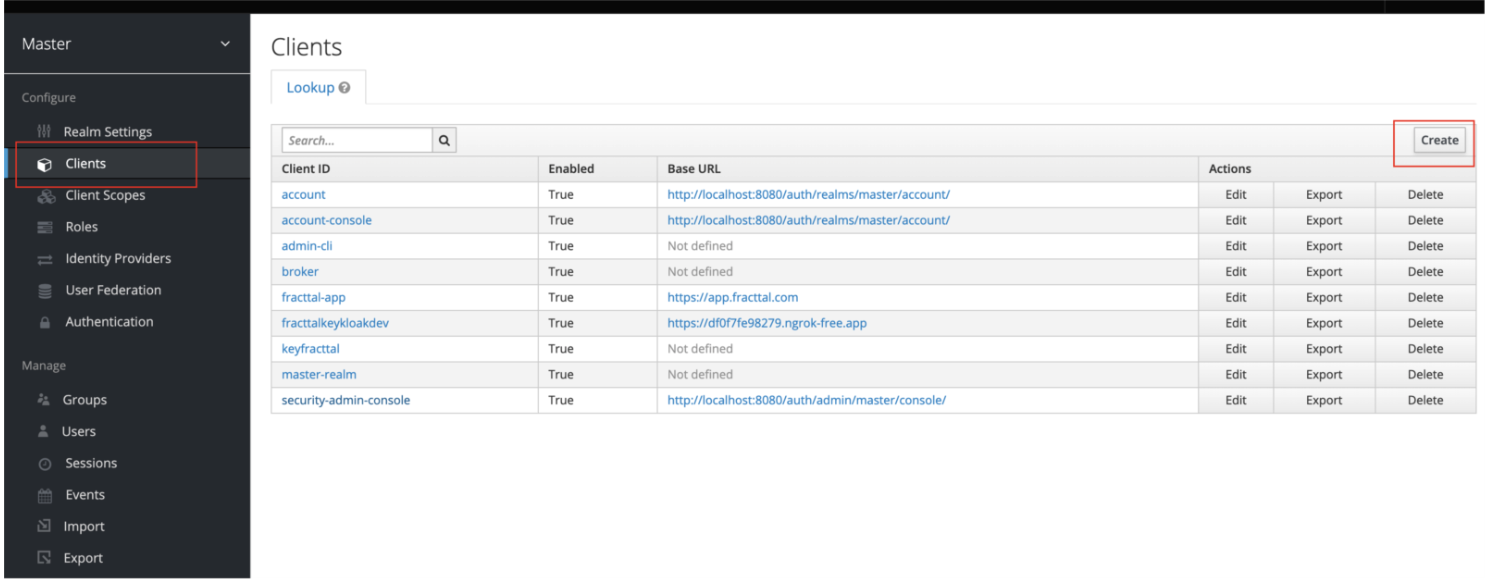
- In the 'Client ID' field, enter the client identifier: fracttal-app. (this is the value I use for the example, but it's at the discretion of whoever configures it. The important thing is that it matches the issuer configured in Fracttal).
- Select 'saml' as Client Protocol.
- Press 'Save' to continue.
SAML Client Configuration
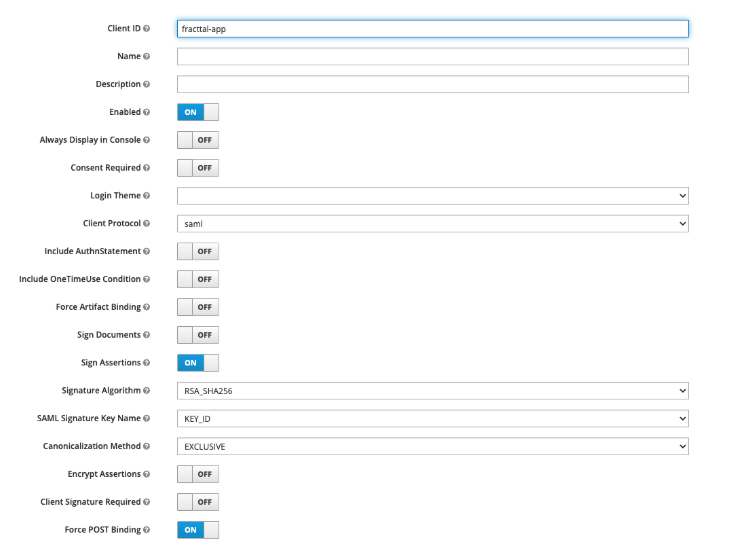
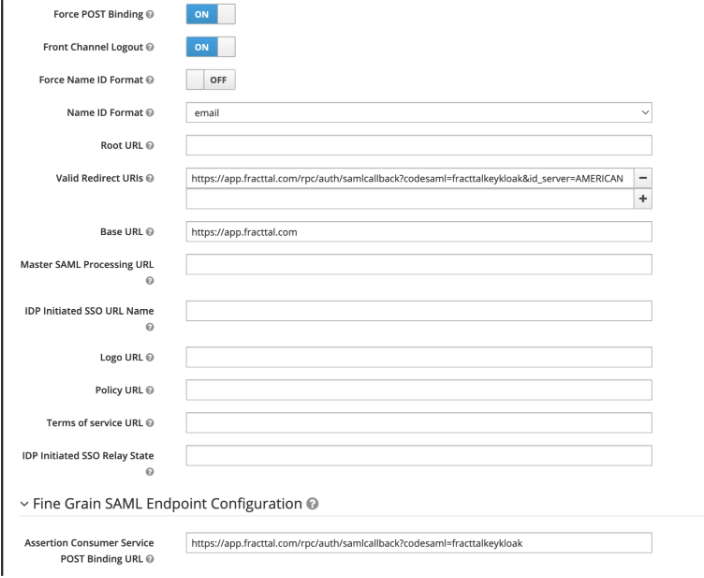
Once the client is created, configure the parameters in the 'Settings' tab as follows:
| Parameter | Value | Description |
|---|---|---|
| Client ID | fracttal-app | Unique client identifier |
| Enabled | ON | Activates the client |
| Client Protocol | saml | Defines the SAML protocol |
| Sign Assertions | ON | This parameter indicates whether Keycloak should sign SAML assertions |
| Signature Algorithm | RSA_SHA256 | Defines the cryptographic algorithm used to generate the digital signature in SAML messages |
| SAML Signature Key Name | KEYID | Specifies how Keycloak identifies the key used to sign the SAML message within the XML |
| Canonicalization Method | EXCLUSIVE | Defines the XML canonicalization method, which is how the document is normalized before applying the digital signature |
| Force POST Binding | ON | Forces the POST method for SAML responses |
| Front Channel Logout | ON | Enables coordinated session logout |
| Name ID Format | Sends the user identifier as email | |
| Valid Redirect URIs | https://app.fracttal.com/rpc/auth/samlcallback?codesaml=fracttalkeykloak&id_server=AMERICAN | Return URI to Fracttal |
| Base URL | https://app.fracttal.com | SP service base URL |
| Assertion Consumer Service POST Binding URL | https://app.fracttal.com/rpc/auth/samlcallback?codesaml=fracttalkeykloak | Endpoint where Fracttal receives SAML responses |
The value 'fracttalkeykloak' must match the key name configured in Fracttal. If another name is used, it should be replaced in all fields where it appears.
It's also not required to perform custom field mappings; just indicating that the NameID Format is email should work.
Configuration in Fracttal
To register the Identity Provider (Keycloak) in Fracttal:
- Access Fracttal with an administrator user.
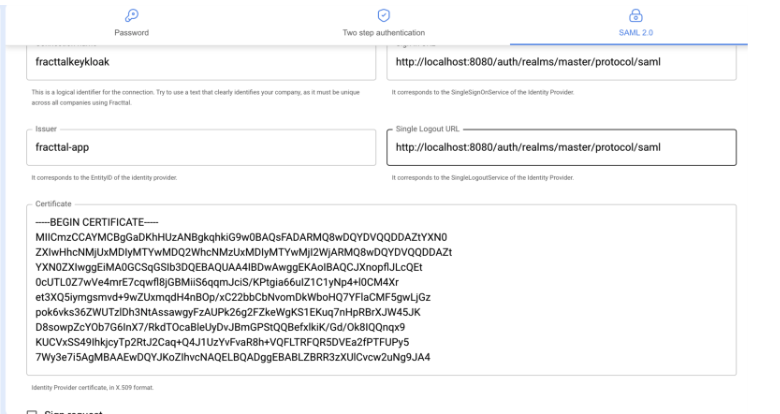
- Go to Configuration → Security → SAML 2.0.
- Complete the fields according to the following table.
| Field | Value |
|---|---|
| Connection/Nickname | fracttalkeykloak |
| Issuer | fracttal-app |
| Single Sign-On URL | http://localhost:8080/auth/realms/master/protocol/saml |
| Single Logout URL | http://localhost:8080/auth/realms/master/protocol/saml |
| Certificate | (X.509 certificate exported from Keycloak) |
The 'Issuer' field must have the same value as the Client ID of the client configured in Keycloak.
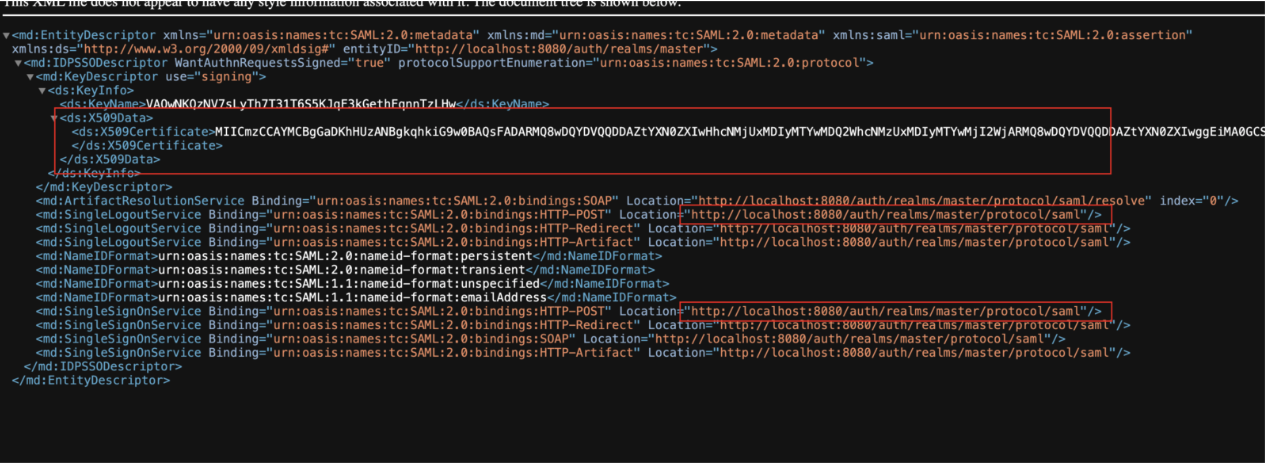
The URL fields (SSO and Logout) are obtained from the Identity Provider metadata in Keycloak, accessible from 'Realm Settings → General → SAML 2.0 Identity Provider Metadata'.
Export IdP Metadata
- In the Realm view, open the 'General' tab.
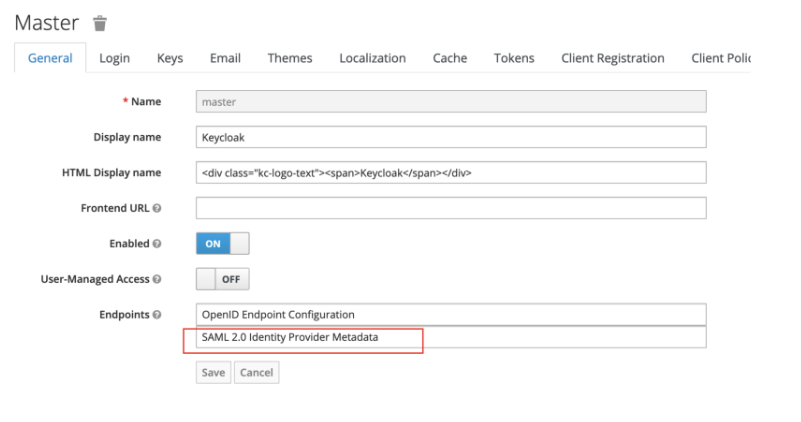
- Click on 'SAML 2.0 Identity Provider Metadata'.
- Copy or download the XML content.
- Extract the certificate and URLs (SingleSignOnService and SingleLogoutService) from the XML.
- These values must match those configured in Fracttal.
Testing and Validation
- Access Fracttal and try to log in with the configured SAML method.
- Verify that it redirects to the Keycloak login.
- Log in with the IdP credentials.
- If authentication is successful, the user will automatically enter Fracttal.
Updated 10 months ago